
Implementation
We’re going to create a new class SSH with a few methods:
- executeSshCommand
- setNewSshSessions
Connecting with SSH to the remote server is always an asynchronous action. Therefore, we need to wait until the execution will be done.
executeSshCommand()
First, we will define a few mandatory constants, which are self-explanatory. One is the path where the private SSH key is located. VRO will use this key to ssh to the remote server. This path is hardcoded. More information can be found here
To support the async execution, we’ll use Promise. If the execution is successful, the promise will resolve the session.output If not, the Promise will reject it.
In the end, we want to close the open session.
public executeSshCommand ( { sshHostname, sshCommand }: { sshHostname: string; sshCommand: string } ): Promise<string> {
    const encoding = "UTF-8";
    const path = "/var/lib/vco/app-server/conf/vco_key";
    const sshKeyPassword = "";
    const sshPort = 22;
    const sshUsername = "root";
    return new Promise<string>( ( resolve, reject ) => {
      const session = this.setNewSshSessions( sshHostname, sshUsername, sshPort )
      session.connectWithIdentity( path, sshKeyPassword );
      session.setEncoding( encoding );
      System.log( `Connected to ${sshHostname}` );
      System.log( `Execute '${sshCommand}' using encoding '${encoding}'` );
      try {
        session.executeCommand( sshCommand, true );
        resolve( session.output )
      } catch ( error ) {
        reject( `Failed to execute SSH command. ${session.error}` );
      } finally {
        if ( session ) {
          session.disconnect();
        }
      }
    } )
  }
setNewSshSessions()
That simple method initializes and returns the SSHSession class. The reason I made it privateis because it will not be used outside that class.
  private setNewSshSessions ( host: string, sshUsername: string, port: number ): SSHSession {
    return new SSHSession( host, sshUsername, port )
  }
Unit-Test
Here's a breakdown of what it does:
- Configuring Mocks:
1. TheexecuteCommandmethod ofsessionMockis mocked to:– Return “Directory listing” for the expected command (sshCommand).– Throw an error for any other command. - Test Verifying Results:
- The test asserts that:
setNewSshSessionswas called by testInstance.connectWithIdentitywas called onsessionMockwith the correct path and password.executeCommandwas called onsessionMockwith the expected command and set to capture output (true).disconnectwas called on sessionMock.- The returned result from
executeSshCommandmatches the simulated output ("Directory listing").
In summary:
This test verifies that the executeSshCommand function successfully connects to an SSH server, executes a specific command, retrieves the output, and disconnects properly. It also checks for error handling if an invalid command is provided.
import { SSH } from "../actions/ssh";

describe( "sshCommands", () => {
  it( "should execute SSH command successfully", async () => {
    const testInstance = new SSH();
    const sshHostname = "example.com";
    const sshCommand = "ls -l";
    const path = "/var/lib/vco/app-server/conf/vco_key" // A static path. Should be always the same
    const sshKeyPassword = ""

    const sessionMock = {
      connectWithIdentity: jasmine.createSpy().and.callThrough(),
      executeCommand: jasmine.createSpy().and.callFake( ( command: string, _: boolean ) => {
        if ( command === sshCommand ) {
          // Simulate successful execution
          sessionMock.output = "Directory listing";
        } else {
          // Simulate an invalid command
          throw new Error( "Invalid command" );
        }
      } ),
      disconnect: jasmine.createSpy(),
      error: "Error message",
      output: "",
      setEncoding: jasmine.createSpy(),
    } as unknown as SSHSession;

    spyOn<any>( testInstance, "setNewSshSessions" ).and.returnValue( sessionMock );
    const result = await testInstance.executeSshCommand( { sshHostname, sshCommand } );

    expect( testInstance["setNewSshSessions"] ).toHaveBeenCalled();
    expect( sessionMock.connectWithIdentity ).toHaveBeenCalledWith( path, sshKeyPassword );
    expect( sessionMock.executeCommand ).toHaveBeenCalledWith( sshCommand, true );
    expect( sessionMock.disconnect ).toHaveBeenCalled();
    expect( result ).toEqual( "Directory listing" );
  } );
Here's a breakdown of what it does:
- Configuring Mocks:
- The
executeCommandmethod ofsessionMockis mocked to throw an error ("Invalid command").
- Testing for Rejection:
- It attempts to call executeSshCommand with the hostname and invalid command data wrapped in an object.
- It uses a try…catch block to handle the expected rejection.
This test verifies that the executeSshCommand function rejects the promise when an SSH command fails (as mocked by the executeCommand method). It checks if the caught error message includes "Failed to execute SSH command", indicating an issue during execution.
  it( "should reject when SSH command fails", async () => {
    const testInstance = new SSH();
    const sshHostname = "example.com";
    const invalidCommand = "invalid-command";

    const sessionMock = {
      connectWithIdentity: jasmine.createSpy(),
      executeCommand: jasmine.createSpy().and.throwError( "Invalid command" ),
      disconnect: jasmine.createSpy(),
      setEncoding: jasmine.createSpy(),
    } as unknown as SSHSession;

    spyOn<any>( testInstance, "setNewSshSessions" ).and.returnValue( sessionMock );

    try {
      await testInstance.executeSshCommand( { sshHostname, sshCommand: invalidCommand } );
      fail( "Expected rejection but promise resolved." );
    } catch ( error ) {
      expect( error ).toContain( "Failed to execute SSH command. undefined" );
    }
  } );
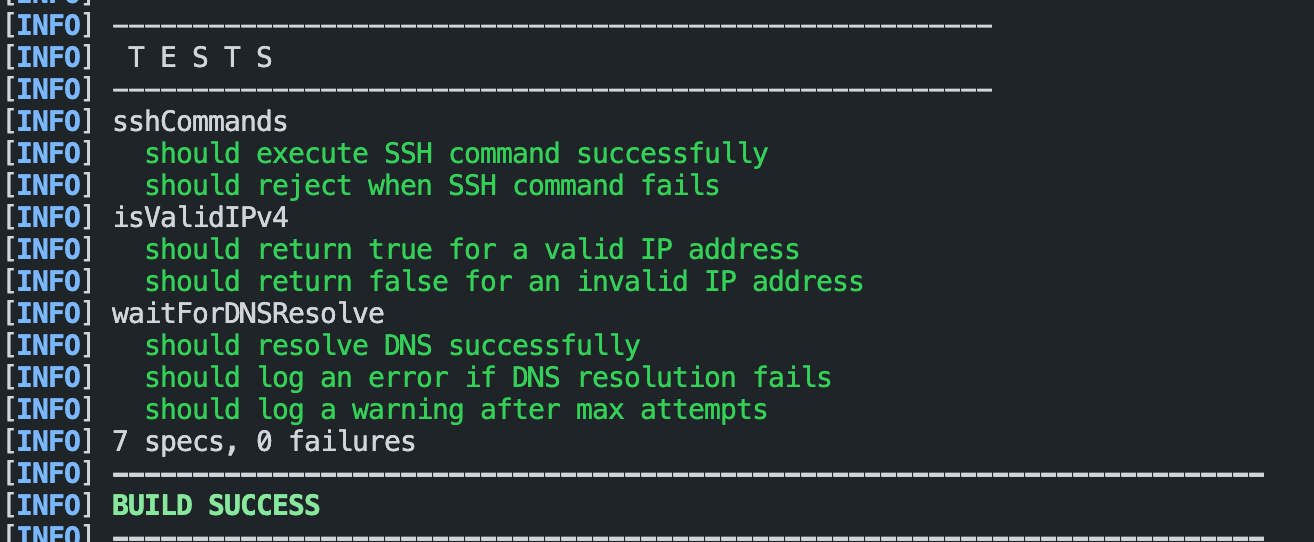
Result
Usage Example
const example = new SSH()
    const vars = {
      sshHostname: "hostname FQDN",
      sshCommand: "uptime",
    };
    example.executeSshCommand(vars)
  }
Source code
The source code with the unit tests can be found here and the external ECMASCRIPT package here.
<div class="alert info">